
← Back to Raman operating instructions
LabSpec 6 Acquisition Panel
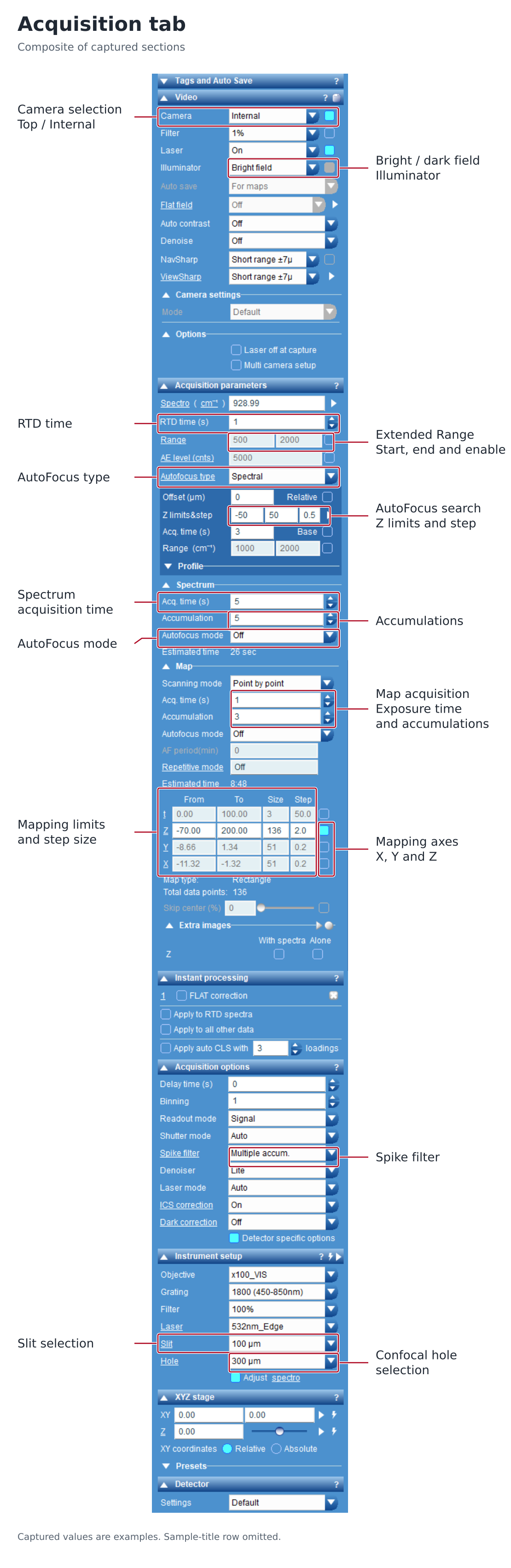
Use this annotated reference to locate controls in the Acquisition tab. Choose a section to jump to its position in the complete panel; the selected section is outlined in blue.
Open full-resolution image to zoom (new tab). On a small screen, open the image to enlarge its labels.
Video
Camera selection (Top or Internal) and the brightfield/darkfield Illuminator control.
Acquisition parameters
RTD time, extended Range, AutoFocus type, and AutoFocus Z limits and step.
Spectrum
Spectrum acquisition time, accumulations and AutoFocus mode.
Map
Map acquisition time and accumulations; mapping limits, step size and X, Y and Z axes.
Acquisition options
Acquisition options, including the Spike filter control.
Instrument setup
Objective, grating, filter, laser, slit and confocal hole selections.
Back to panel section links · Return to Raman operating instructions